VMware Snapshot Overview
One of the benefits of virtualisation is the ability to take snapshot(s) of virtual machines. VM snapshots are point-in-time bookmarks that allow us to easily preserve states and data of VM.
A common use case of VM snapshots in a VMware vSphere environment is roll-back protection for authorised changes. For example, before a patch is being applied to a VM, engineers could take a snapshot prior to the upgrade to facilitate the ability roll-back quickly in the event of critical failure.
Another common usage of VM snapshots is for VM backup. VM-aware backup technology uses snapshot to put VM in either crash or application consistent state, in order to then backup the base disk(s).
Table of Contents
Behaviour of Traditional VM Snapshots
Most VMware environment rely on the traditional VM snapshot technology for preserve VM state (except for environment that run on VSAN (VMware Virtual SAN) or using Virtual Volumes (VMware VVols)).
In the traditional VM snapshot, ESXi host uses the redo log format snapshot to preserve states. A child delta disk is created after a snapshot is requested to capture modified blocks. The parent disk (base disk) becomes the point-in-time copy. Incoming writes will now go to the child delta disk, and read will be served by combination of base and child delta disk, depending on where the blocks are located. If another snapshot is issued, another chain is created where the new child delta disk becomes the new writes landing space.
When consolidation operation is issued (i.e., when we are required to delete snapshot), the ESXi host will need to merge changes from the child delta disks into the base disk, before turning the base disk into writeable again. The process of consolidating snapshots is very IO intensive, as it involves copying delta and write to the base disk. The more delta disks you have or the bigger the delta, the longer it will take to consolidate.
Note
In vSphere ESXi 6, VMware made a small but significant change to the way ESXi handles snapshots consolidation.
Prior to ESXi 6, when committing snapshot deltas, in order to handle active incoming write IOs, the older ESXi would redirect the write IOs to a Consolidate Helper snapshot. At the end of the snapshot consolidation process, ESXi would then attempt to flush the remaining “captured” changes in the “Consolidate Helper” snapshot to the base disk. If the VM is highly active, and the size of the Consolidate Helper snapshot is large, the final process would fail and the Consolidate Helper snapshot would get left behind. i.e., That is why some VMs have Consolidate Helper-0 snapshots after overnight backup.
In ESXi 6, VMware changed consolidation process. When committing the snapshots, all active incoming writes are redirected (using mirror driver) to the base VMDKs instead. This means that ESXi now can do away the consolidate helper snapshot as the interim staging area for active writes. This should, hopefully, significantly reduce the stun to the VM during snapshots consolidation.
Apart from increased disk IO operations, snapshots consolidation is further complicated by the fact that during the redo of applying changes back to parent disks, the process will introduce a stun [1] to the VM to allow in-flight IOs to complete and write back to the base disk. If a VM is generating a lot of IOs, it could prolong the stun time (or sometimes fail to commit to base disk) and cause stability issue within the VM itself.
Issues with Traditional VM Snapshots
Due to the behaviour of the traditional VM snapshots, it has the potential of causing various negative effects on VMs. Traditional snapshots introduce significant impact on disk IO performance. VMware released KB 1025279, as a best practice guide for VM snapshots, specifically to warn against the negative impacts that snapshots introduce.
The general good house-keeping practice is to minimise the duration of snapshots running as much as possible, no more than 24-48 hours as a general guideline.
Traditional VM Snapshots with VSS
Work in progress
Behaviour of VVols VM Snapshots
Starting from vSphere 6.0, VMware introduced a new iteration of storage integration architecture called VVols (Virtual Volumes). The whole purpose of VVols is to provide a framework for storage vendor to allow management of VM disks and files as objects and be able to tie in rich policies feature set to apply on granular level.
Due to the fact that VMs and their properties are now being treated as individual ‘object’ to the storage, rich data services may now be served from the back-end storage driven by policies (capabilities and features vary between vendors’ implementations), i.e., QoS, replication, compression/deduplication etc. As such, operations like VM snapshots can be offloaded to the storage array.
Snapshots in VVols are pointer base, where the running state of the VM is now the base disk (conceptually speaking), as opposed to child delta disk in the traditional method. This makes the new snapshot process a lot more efficient. Removal of snapshots are now snapshot object manipulation, rather than committing redo log into the based disks, this will minimise the IO impact to the running state of a VM.
For further information, please refer to VMware KB 2113013.
Note
VMware vSphere 6.x is required (with selected certified storage vendors) in order to have VVols capabilities in the moment. Number of features available through VVols are dependent on vendors’ implementation
Behaviour of VSAN VM Snapshots
VMware introduced a new on-disk format in VSAN 6.0, vsanSparse. In principal, the snapshot process behaviour is similiar to that of VVols, in that snapshots are now just pointers where the running state of the VM is the base disk. Because of this, the removal of snapshot is now almost instantaneous.
Note
VMware vSphere 6.x is required to run VSAN 6.x
Performance Impact Analysis on Snapshots
Traditional VM snapshots are very costly and taxing on storage IO utilisation. On top of that, removing/merging snapshots in the traditional way is extremely inefficient in that the delta disk(s) will have to be copied and write back into the parent disk(s). These inefficiencies can result in dramatic performance degradation on the VMs as well as the storage controllers.
The arrival of VVols changes how vSphere handles snapshots fundamentally. This section will examine the performance difference between traditional snapshot against VVols snapshot. The analysis here are based on Tintri T880 storage controllers. Different storage vendors have different implementation of VVols and different levels of functionalities exposed to vSphere. The results shown here may or may not be applicable to other storage vendors’ products.
Snapshots Analysis Setup & Configuration
To perform the analysis on traditional and VVols snapshots, two virtual machines were created in test lab. Both virtual machines reside on the same Tintri T880 storage controller, the only difference is that one was created on a normal NFS datastore presented to vSphere, and the other was created on VVols datastore presented to vSphere. Both virtual machines were configured with exactly the same specs as below,
| ATTRIBUTE | SPECIFICATION |
|---|---|
| Server OS | Microsoft Windows Server 2012 R2 (64-bit) |
| VMware virtual hardware | Version 11 |
| VMware Tools version | Version 10 |
| Virtual CPU | 4 (4 virtual sockets x 1 virtual core per socket) |
| Virtual memory | 16GB |
| vNIC | 1 (VMXNET3) |
| Virtual SCSI controller 0 | Paravirtual (PVSCSI) |
| Virtual SCSI controller 1 | Paravirtual (PVSCSI) |
| Virtual Disk - OS VMDK | 40GB (Thin, vSCSI 0:0) |
| Virtual Disk - Data VMDK | 100GB (Thin, vSCSI 1:0) |
To investigate the performance impact of vSphere snapshots have on workloads, CrystalMark was installed and configured with the following parameters.
| ATTRIBUTE | SPECIFICATION |
|---|---|
| Test Data Pattern | Default (Random) |
| Test Data Size | 32GB |
| Queues & Threads | Sequential & Random (Queues = 64, Threads = 4) |
| Number of Runs | 8 |
| Interval Time | 5 Sec |
| Random block size | 4KB |
| Sequential block size | 1MB |
Snapshots Analysis Results
The same CrystalMark benchmark test was cycled 6 times on the NFS datastores (and 10 times on VVOLs datastores), from the baseline of no snapshot, to 6 levels (or 10 levels on VVOLS) deep of snapshots.
Snapshots Analysis Results - Sequential Workloads
Let us first look at the sequential read/write results for both VVOLS and normal NFS storage snapshots. The sequential workloads consist of the read and write throughput of using 1MB IO block size. Note that the dataset is 32GB of randomised contents.
The Y-axis is the throughput results in MB/s (MegaBytes per second), and the X-axis is the number of snapshots running on the VM (0 means no snapshot - i.e., the baseline figure)
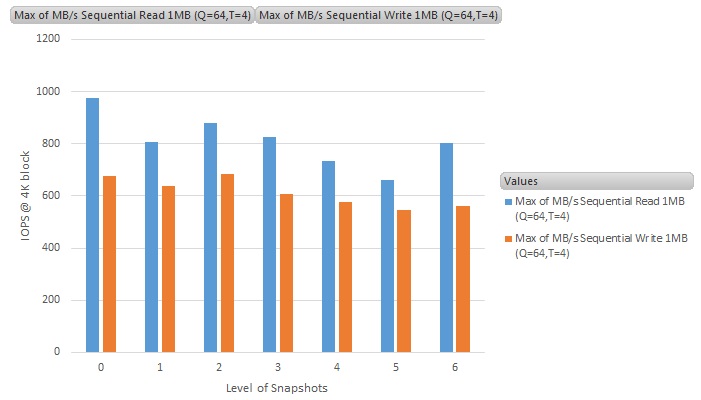
Sequential read/write throughput results of traditional snapshots on NFS datstore
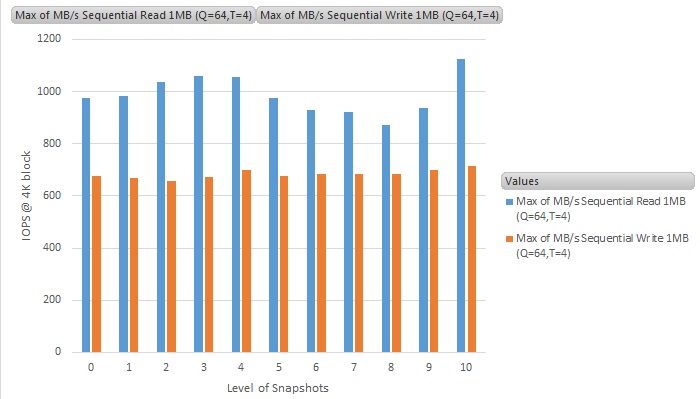
Sequential read/write throughput results of snapshots on VVOL datastore
For sequential workloads, the average performance difference between having no snapshots and multiple snapshots remain pretty much constant on VVOL, and with a slight performance hit on normal NFS datastore. The results are as expected, as the sequential behaviour of the benchmark requires very little double checking of data between delta and base disks, though we can still expect 10% to 15% performance hit on the traditional vSphere snapshots and no performance hit by using VVOL.
Snapshots Analysis Results - Random IO Workloads
Let us now look at the results for random seek workloads. These workloads are based on 4K IO block size on the same 32GB dataset that contains randomised contents.
The Y-axis is the throughput results in IOPS (Input-output per second), and the X-axis is the number of snapshots running on the VM (0 means no snapshot - i.e., the baseline figure)
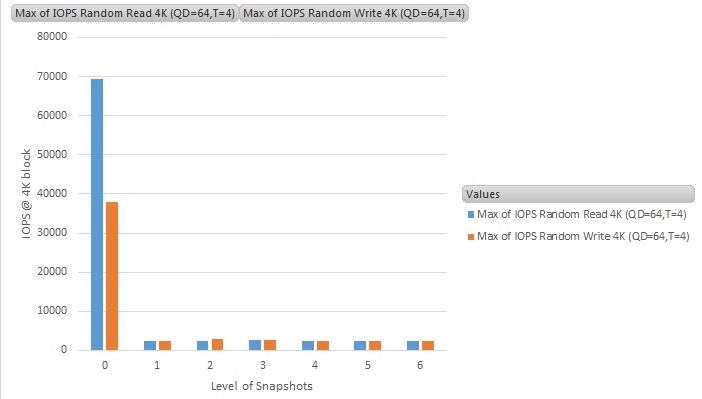
Random read/write IOPS results of traditional snapshots on NFS datstore
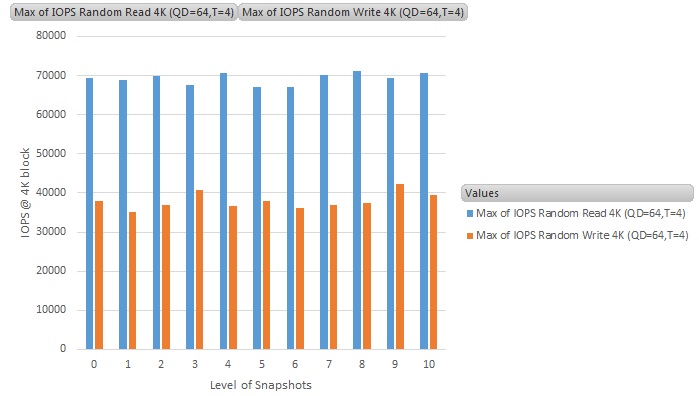
Random read/write IOPS results of snapshots on VVOL datastore
Random IO workloads is where the traditional vSphere snapshot suffers the most. We see a dramatic decrease in IO performance when a VM has a traditional vSphere snapshot running, a factor of 10 times slower. This is the worst case scenario, as not all workloads are 100% random in nature (as per benchmark tests on Jetstress, where the workloads is mixture of random and sequential, the performance hit is closer 50%. Still not good at all, but not as bad as 10 times slower - results of this will be disclosed if time permits).
For the VM running snapshots on VVOL datastore, we can see that there is absolutely no performance impact at all on the performance. This is a great improvement on how VMware worked on the way vSphere will handle snapshots going forward.
Snapshots Analysis Results - Duration of Snapshots Removal
In this section, we will look at the performance difference between VVOL and traditional vSphere snapshots removal.

Snapshots removal duration comparison between VVOL and traditional vSphere snapshots
Highlighted in yellow is the duration it took for VVOL to remove multiple level of snapshots. In contrast, the duration of snapshots removal in the traditional vSphere snapshots is underlined in red. Here we can see that during removal of snapshots, VVOL is really fast and independent of the size of the snapshots. Most of the the time spent on the snapshots removal task was in the control traffic between vSphere and the storage controller’s VASA provider and vSphere manipulating the pointer disks references, as mentioned in Behaviour of VVols VM Snapshots.
Whereas in the traditional vSphere snapshots, it is in the order of almost 15x slower, and is in direct proportion to how big the snapshots deltas are as they all need to be copied and merge back into the base disk(s).
These results show that when it comes to traditional vSphere snapshots (which is pretty much everything NOT running on VVOLs and VSAN), use of snapshots should be minimised or avoided unless absolutely necessary (i.e., during VADP backup, or scheduled maintenance). They should be deleted as soon as possible and not to be left running for long period of time. As delta files build up, its performance will greatly degrade and removal time will increase as deltas grow.
| [1] | A stun is an operation where a VM is placed in a temporary pause state to allow any in-flight outstanding disk IOs to complete. A stun on a VM is required to create or delete snapshots, and also to migrate disk (storage vMotion). This is to ensure that VM is kept a state where all IOs are being captured during those operations. A stun generally result in hundreds of milliseconds in an optimal operating condition, to longer if the storage or the VM is really busy. |